8 Best Yuka Alternatives for Smarter Food Choices
Yuka has become one of the world's most popular food scanner apps thanks to its simple barcode scanning and easy-to-understand product ratings. With a quick scan, shoppers can learn more about ingredients, nutrition, food additives, and even cosmetic products.
However, no single app is perfect for everyone.
Some users want deeper ingredient explanations, while others need better nutrition tracking, allergen information, open food databases, or support for products that aren't available in Yuka's database.
If you're searching for the best Yuka alternatives, this guide compares the top food scanner apps, explains their strengths and weaknesses, and helps you choose the one that best fits your shopping habits.
If you're new to food scanning, you can also explore EaterIQ's Food Barcode Scanner to see how scanning ingredients and nutrition labels can simplify grocery shopping.
Why Look for a Yuka Alternative?
Yuka is an excellent starting point, but many users eventually discover limitations depending on how they shop.
Common reasons people look for alternatives include:
Want more detailed ingredient explanations
Need better nutrition insights
Looking for allergen information
Prefer educational content instead of a single product score
Need support for local food brands
Want broader barcode database coverage
Looking for completely free alternatives
The best alternative depends on whether your priority is ingredient transparency, calorie tracking, food education, or barcode scanning.
What Makes a Great Food Scanner App?
Before choosing an app, consider these important features:
Accurate barcode scanning
Large food database
Ingredient explanations
Nutrition label analysis
Food additive information
Product comparison
Easy-to-use interface
Regular database updates
Evidence-based information
Apps that explain why a product is rated a certain way often provide more long-term value than apps that only display an overall score.
1. EaterIQ
Best For: Understanding ingredients and nutrition labels
EaterIQ focuses on helping shoppers understand packaged foods rather than simply assigning a health score.
Instead of only displaying ratings, it explains:
What ingredients are
Why manufacturers use them
Nutrition label information
Food additives
Product insights
Its educational approach makes it particularly useful for people who want to become better at reading food labels.
Pros
✔ Easy ingredient explanations
✔ Beginner friendly
✔ Nutrition-focused
✔ Barcode scanning
✔ Educational insights
Cons
Cosmetic scanning isn't its primary focus.
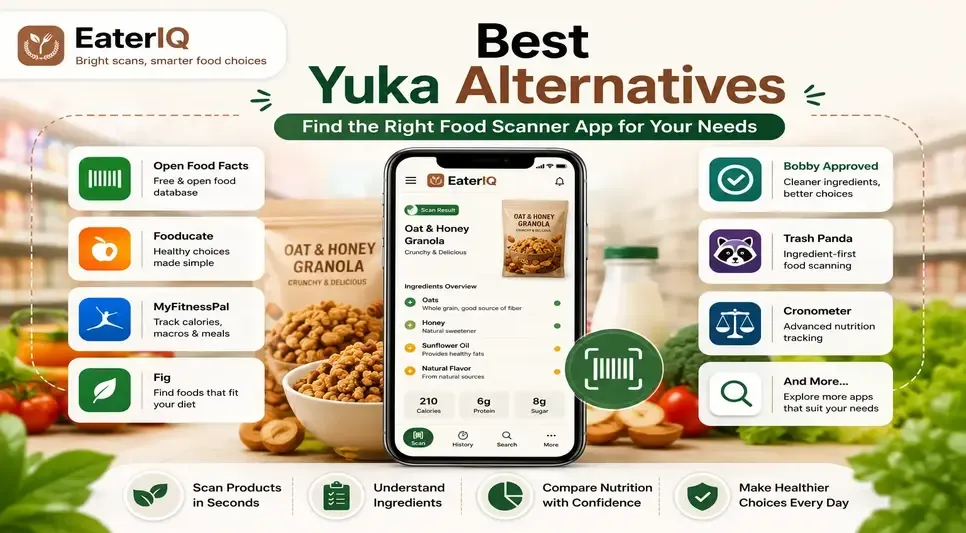
2. Open Food Facts
Best For: Free and open food database
Open Food Facts is a community-driven database containing millions of food products from around the world.
It's ideal for users who value transparency and open data.
Pros
Completely free
Huge community database
Excellent international coverage
Open-source project
Cons
Information quality depends on community contributions.
3. Fooducate
Best For: Nutrition education
Fooducate combines food scanning with nutrition coaching.
It helps users compare foods while also explaining calories, nutrients, and healthier alternatives.
Pros
Nutrition coaching
Barcode scanner
Food grading
Healthy alternatives
Cons
Some premium features require a subscription.
4. MyFitnessPal
Best For: Calorie and macro tracking
If your primary goal is tracking calories, protein, carbohydrates, and fat, MyFitnessPal remains one of the strongest choices.
It includes:
Food diary
Barcode scanner
Macro tracking
Meal logging
Pros
Massive food database
Fitness integrations
Meal tracking
Cons
Ingredient education isn't its main strength.
5. Fig
Best For: Food allergies and dietary restrictions
Fig helps shoppers identify foods that match specific dietary needs.
It's especially useful for people following:
Gluten-free diets
Vegan diets
Dairy-free diets
Nut-free diets
Rather than giving general scores, it filters products based on individual dietary preferences.
6. Bobby Approved
Best For: Clean ingredient shopping
Bobby Approved focuses on identifying foods made with simpler ingredients and fewer highly processed additives.
Many shoppers use it when comparing packaged foods with a focus on ingredient quality.
7. Trash Panda
Best For: Ingredient-first analysis
Trash Panda emphasizes ingredient transparency over calories or macronutrients.
It's designed for shoppers who care more about what ingredients are inside a product than its calorie count.
8. Cronometer
Best For: Detailed nutrition tracking
Cronometer is widely used by people who want precise nutrient tracking.
It goes beyond calories by monitoring vitamins, minerals, and micronutrients, making it popular with athletes and health-conscious users.
Comparison Table
App | Best For | Barcode Scanner | Ingredient Insights | Nutrition Tracking |
EaterIQ | Ingredient education | ✅ | ⭐⭐⭐⭐⭐ | ⭐⭐⭐⭐⭐ |
Open Food Facts | Free database | ✅ | ⭐⭐⭐⭐ | ⭐⭐⭐ |
Fooducate | Healthy eating | ✅ | ⭐⭐⭐⭐ | ⭐⭐⭐⭐ |
MyFitnessPal | Calories | ✅ | ⭐⭐ | ⭐⭐⭐⭐⭐ |
Fig | Allergies | ✅ | ⭐⭐⭐⭐ | ⭐⭐⭐ |
Bobby Approved | Clean ingredients | ✅ | ⭐⭐⭐⭐ | ⭐⭐⭐ |
Trash Panda | Ingredient quality | ✅ | ⭐⭐⭐⭐⭐ | ⭐⭐ |
Cronometer | Nutrition analysis | ✅ | ⭐⭐⭐ | ⭐⭐⭐⭐⭐ |
Which Yuka Alternative Is Right for You?
Choose EaterIQ if you:
Want to understand ingredients
Read nutrition labels
Compare packaged foods
Learn about food additives
Choose Open Food Facts if you:
Want a free, open-source solution
Prefer community-driven food information
Choose MyFitnessPal if you:
Count calories
Track macros
Log meals daily
Choose Fig if you:
Have allergies
Follow a special diet
Need ingredient filtering
Choose Cronometer if you:
Track micronutrients
Want advanced nutrition analysis
Tips for Choosing a Food Scanner App
Before downloading an app, ask yourself:
Do I want quick scores or detailed explanations?
Am I focused on calories or ingredients?
Do I need allergy support?
Will I use it every grocery trip?
Does it support products sold in my country?
Using a Nutrition Label Scanner regularly can help you compare products more confidently and build healthier shopping habits over time.
Frequently Asked Questions
What is the best alternative to Yuka?
It depends on your needs. EaterIQ is ideal for ingredient education, Open Food Facts is great for free barcode scanning, MyFitnessPal excels at calorie tracking, and Fig is excellent for dietary restrictions.
Is there a free alternative to Yuka?
Yes. Open Food Facts offers a free, open-source food database with barcode scanning capabilities.
Which app explains ingredients the best?
Apps focused on ingredient education, such as EaterIQ, provide more detailed explanations that help users understand food labels instead of relying solely on a product score.
Which app is best for calorie tracking?
MyFitnessPal and Cronometer are two of the strongest choices for tracking calories, macros, and nutrients.
Are food scanner apps accurate?
Most food scanner apps provide helpful information, but their accuracy depends on the quality of their databases and how frequently they are updated. They should complement, not replace, reading nutrition labels and ingredient lists.
Conclusion
Yuka remains a popular choice for barcode scanning, but it's far from the only option. Whether you're looking for deeper ingredient explanations, better nutrition tracking, allergy support, or a free food database, there's an app designed for your needs.
For shoppers who want to learn what's actually inside packaged foods, not just receive a score, EaterIQ offers an educational approach that makes ingredient lists and nutrition labels easier to understand. Meanwhile, apps like Open Food Facts, Fooducate, MyFitnessPal, and Fig each excel in their own areas.
The best food scanner app is the one that matches your personal goals and helps you make informed decisions every time you shop.